Plugins  /  PaperEQ
SEVEN-BAND EQ · v1.0.0 · FREE

PaperEQ

An EQ drawn in pen on a page of lined notebook paper. Seven bands with the shape you want, a dynamic EQ, tube and transient on every band, and a pen: hold alt, draw the curve you hear in your head, and the bands bend to follow it.
Free7 bands · 8 shapesBrickwall cutsDynamic EQSidechainTube · TransientDraw the curveUp to 16x oversampling20 presets
MADE WITH LOVE · FREE FOREVER

PaperEQ is free. Your love keeps it that way.

I draw, build and give away PaperEQ for nothing, with no ads and no account. If it has a place in your music, a small thank-you means the world and helps me make the next free plug-in.

A one-off thank-you through Moonbase. Nothing to download or activate: PaperEQ is already all yours.
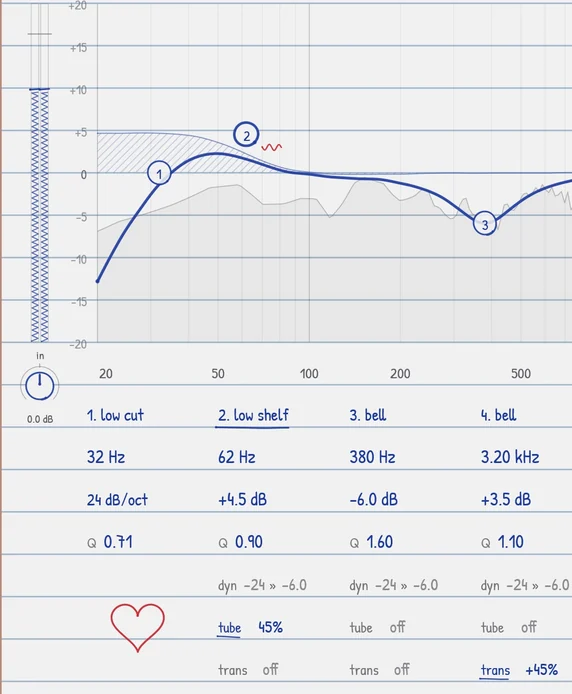
The left half of PaperEQ with a kick drum setting: a low cut, a low shelf boosted 4.5 dB with tube, a bell cut at 380 Hz, and each band's settings handwritten underneath
01 / BANDS

Seven bands, eight shapes

Each circled number is a band. Drag it for the frequency and the boost or cut, scroll on it for the Q, double-click it to switch it on or off. Click a band's name for its shape: bell, low and high shelf, low and high cut from 12 to 48 dB per octave or brickwall, notch, band pass and tilt. Every written number can be dragged, or double-clicked and typed. Hold ctrl and click a dot to hear that band on its own.

The right half of PaperEQ with a vocal setting: band 5 is a narrow dynamic dip at 7.2 kHz, shown by a dashed arrow under its dot, and band 6 is a high shelf with tube, marked by a small red wave
02 / DYNAMICS

dyn, tube and trans

Under every bell and shelf: dyn makes the band move with the level, from its threshold toward its range, so a harsh note dips only when it rings out. Switch on sidechain and it listens to another track instead, to make room for a kick or a voice. tube adds warm saturation to just that band, and trans makes its attacks harder or softer. Little marks by each dot show what is on.

03 / PEN

Draw the curve

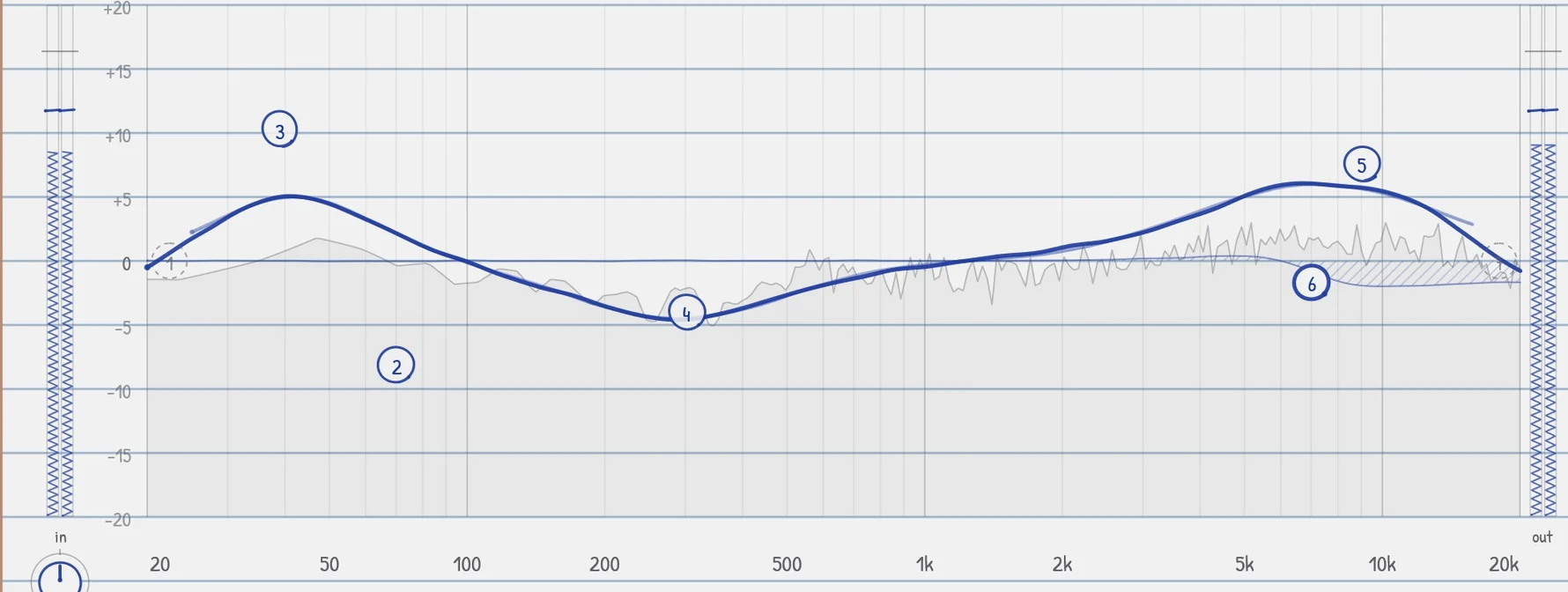
Hold alt and draw on the graph: the bands move so the curve follows your line. Alt anywhere else on the page writes notes in red pen, saved with your project. Hold the right mouse button and rub to erase: the curve flattens where you rub.

A curve drawn with the pen across PaperEQ's graph, a boost in the lows, a dip around 300 Hz and a lift in the highs, with the bands moved into place to follow it
04 / CUTS

Brickwall cuts, clean top

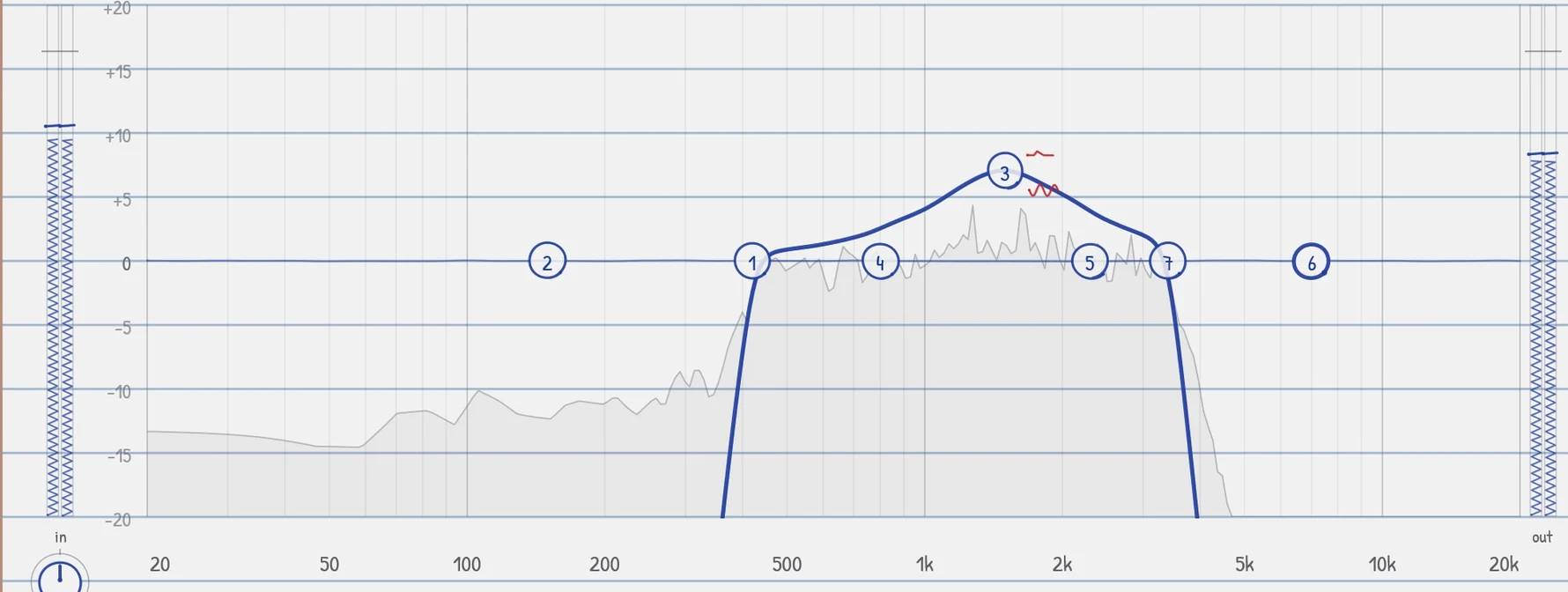
The low and high cuts go up to a brickwall, 96 dB per octave, flat right up to the corner. Run the EQ at 2, 4, 8 or 16 times the sample rate and the curve keeps its shape near 20 kHz and the tube folds back less. The filters work in double precision, so even a brickwall at 30 Hz stays exact.

PaperEQ's Telephone preset: brickwall cuts at 420 Hz and 3.4 kHz leave a narrow band, boosted by a bell at 1.5 kHz with tube
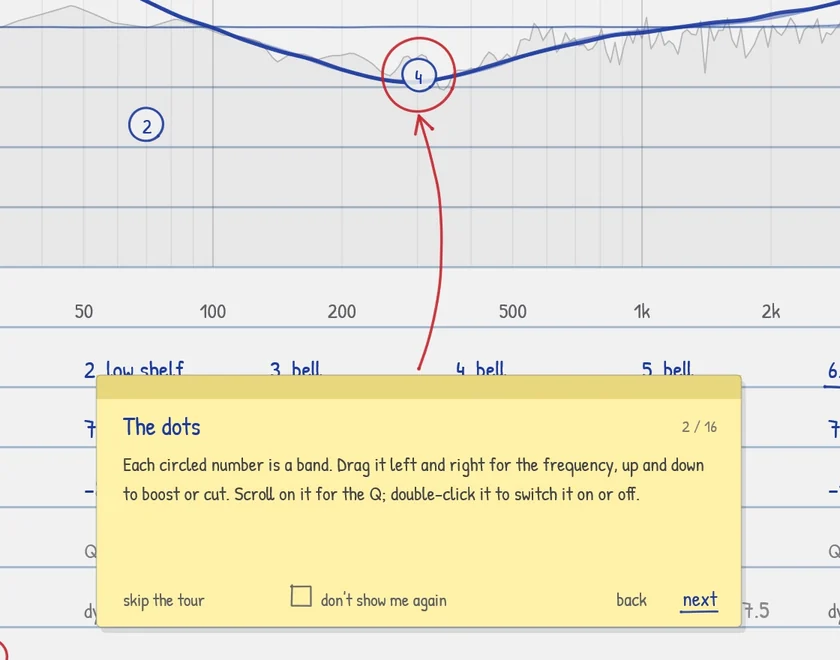
A yellow sticky note on the page explains the dots, with a red pen arrow to band 4; along its bottom are skip the tour, a don't show me again box, back and next
05 / TIPS

A tour on a sticky note

The first time you open PaperEQ, a sticky note walks you round the page, a red arrow pointing at each thing it explains. Skip it whenever you like, tick don't show me again, or bring it back with tips at the foot of the page.

06 / FEATURES

20 presets and yours

Kick Thump, Snare Crack, Floor Tom Boom, Vocal Air, De-Ess, Bass Weight, Mix Smile, Master Polish, Telephone, Lo-Fi Radio and more. Save your own under a name; they are files you can share.

A/B

Two versions of every setting. Flip between them, copy one onto the other, or reset to a clean page.

Meters and input

Pen-shaded meters for what goes in and what comes out, an input gain knob, an output level and a live analyser behind the curve.

Several bands at once

Drag a box round dots, shift-click them or double-click the graph for all of them, and move them together. With ctrl, their boosts and cuts grow or shrink.

Smooth

Settings glide and shapes cross-fade, so dragging, switching and automating never click. Bypass fades too.

Blue or black pen

Pick the ink. The window scales from half to twice its size, and the whole page always fits.

INSTALLING
  1. Download it and close your DAW.
  2. Right-click the zip, choose Extract All, and open PaperEQ Setup 1.0.0 (Windows).exe. Windows may say it protected your PC, because the installer is not signed: choose More info, then Run anyway.
  3. Choose the plug-in alone or with the standalone app, and finish the installer.
  4. Open your DAW. Most find a new plug-in when they start; if yours does not, rescan plug-ins. PaperEQ is with the EQ effects, under George Ergemlidze.

Help with installing · Rather not run an installer? Download the plug-in alone and copy the folder PaperEQ.vst3 into C:\Program Files\Common Files\VST3.

On a Mac: download the installer, close your DAW, open the installer and tick the formats you want (Audio Unit, VST3, the standalone app).

SYSTEM REQUIREMENTS
Windows
10 or 11, 64-bit
macOS
11 or later, Apple silicon and Intel
Format
VST3 and a standalone app; on a Mac, Audio Unit too
Channels
Mono or stereo, with a sidechain input
FAQ

Is it really free?

Yes. No trial, no account, no activation.

Which DAWs does it work in?

Any DAW that loads VST3 plug-ins, such as Ableton Live, FL Studio, Cubase, Reaper, Studio One and Bitwig, and on a Mac any that loads Audio Units, such as Logic Pro and GarageBand. There is no AAX version, so not in Pro Tools.

How do I use the sidechain?

Route another track into PaperEQ's sidechain input in your DAW, click sidechain at the top of the page, and switch on dyn on the bands that should react. They then dip when the other track is loud.

Where are my own presets kept?

In Documents\PaperEQ\Presets, one file each, shared by every project and the standalone app.

What was Notebook EQ?

PaperEQ's first name. The installer replaces it, and projects that used it open with PaperEQ, settings and all.

What is the standalone app for?

It runs PaperEQ on its own, on your computer's audio input, with no DAW. Choose your audio device and unmute the input under Options.

● REC
NEWS

Get news & updates

New music, new plugins and free updates — straight to your inbox. No spam. Unsubscribe anytime.

You will get one email to confirm your address. Privacy policy